Guide To Enumerating Active Directory
Learn how to navigate the complex world of Active Directory. This guide covers how to perform unauthenticated enumeration, leverage common protocol misconfigurations like LLMNR/NBT-NS, weak or common credentials and identify other various misconfigurations that leads to your first set of domain credentials.
Enumerating Active Directory
Active Directory (AD) is a directory service developed by Microsoft for Windows domain networks. It is used for specialized services such as Layer 2 protocol management, LDAP, and Kerberos authentication. In a CTF or real-world engagement, the Domain Controller (DC) is the most valuable asset in the system. We will be going through how you can start from a position of zero access on a network and move toward gaining your first domain user account. We will focus on identifying misconfigurations in how Windows handles name resolution and how to “ask” the Domain Controller for information without a password.
Initial recon
Since we are starting with no credentials, our first goal is to find out what/who is on the network and what the domain is called. We can start that by finding the domain controller(s) in the environment, usually in ctf’s we are almost always going to be facing the domain controller but that is not always the case when faced with engagements.
Given an ip or subnet, we can start by identifying the assets(DC and other machines) in the network. Taking this ip 10.10.10.9 or subnet 10.10.10.0/24 for example, we can start by running the following command:
1
fping -aqg 10.10.10.0/24

The command above allows us to perform a fast ICMP sweep of the entire 10.1.0.0/24 subnet to identify which machines are online
fping is a fast network probing tool used to send ICMP echo requests (pings) to multiple hosts at once. Unlike the traditional ping command, which tests one host at a time, fping is designed for scanning entire subnets efficiently.
Identifying the Domain Controller
With the ip(s), we can go ahead to identify the domain controller. To start, We can use nmap to look for specific ports like 389 (LDAP), 88 (Kerberos), 53(DNS) and 445 (SMB).These ports being open suggest a machine is a Domain Controller.
1
nmap -Pn 10.10.10.0/24
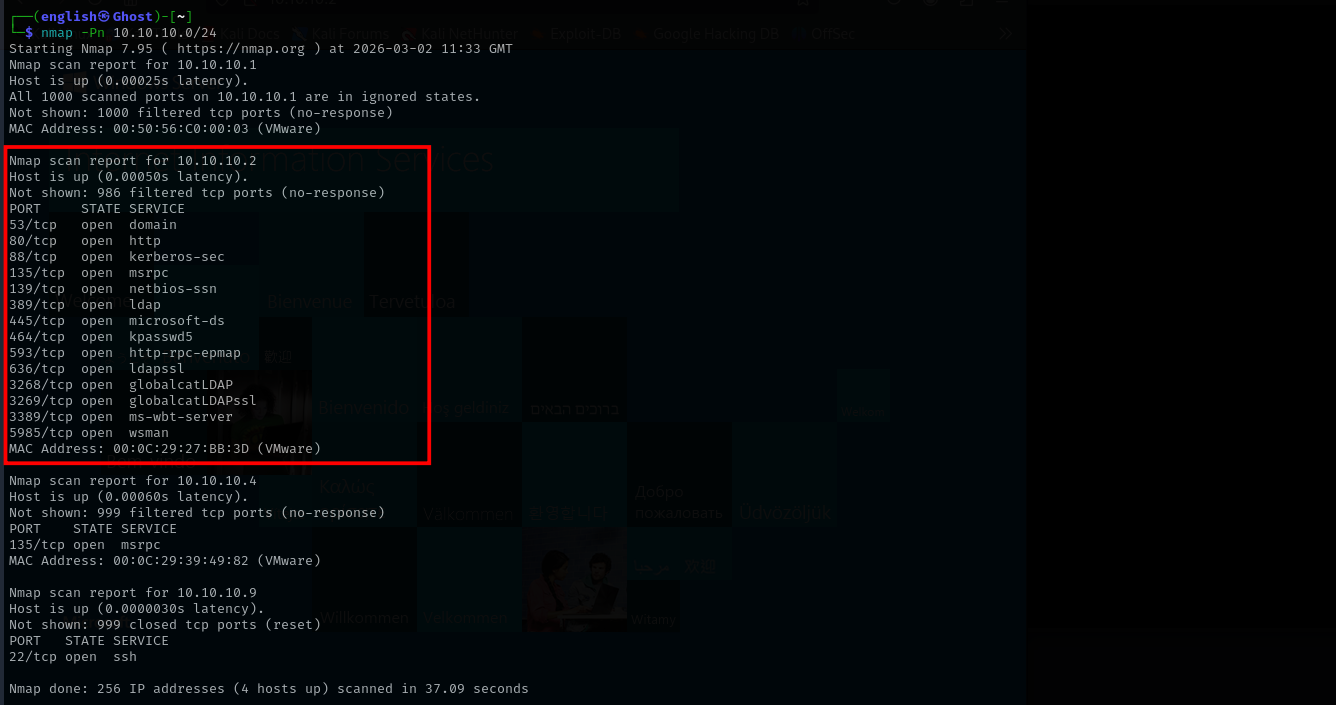
Nmap is a network scanning tool used to discover live hosts, open ports, running services, and operating system details. It is typically one of the first tools used during reconnaissance to map out a target network.
Now that we have identified the Domain Controller at 10.10.10.2, we can proceed with a more detailed scan to gather additional information about the target.
1
sudo nmap -sCV 10.10.10.2
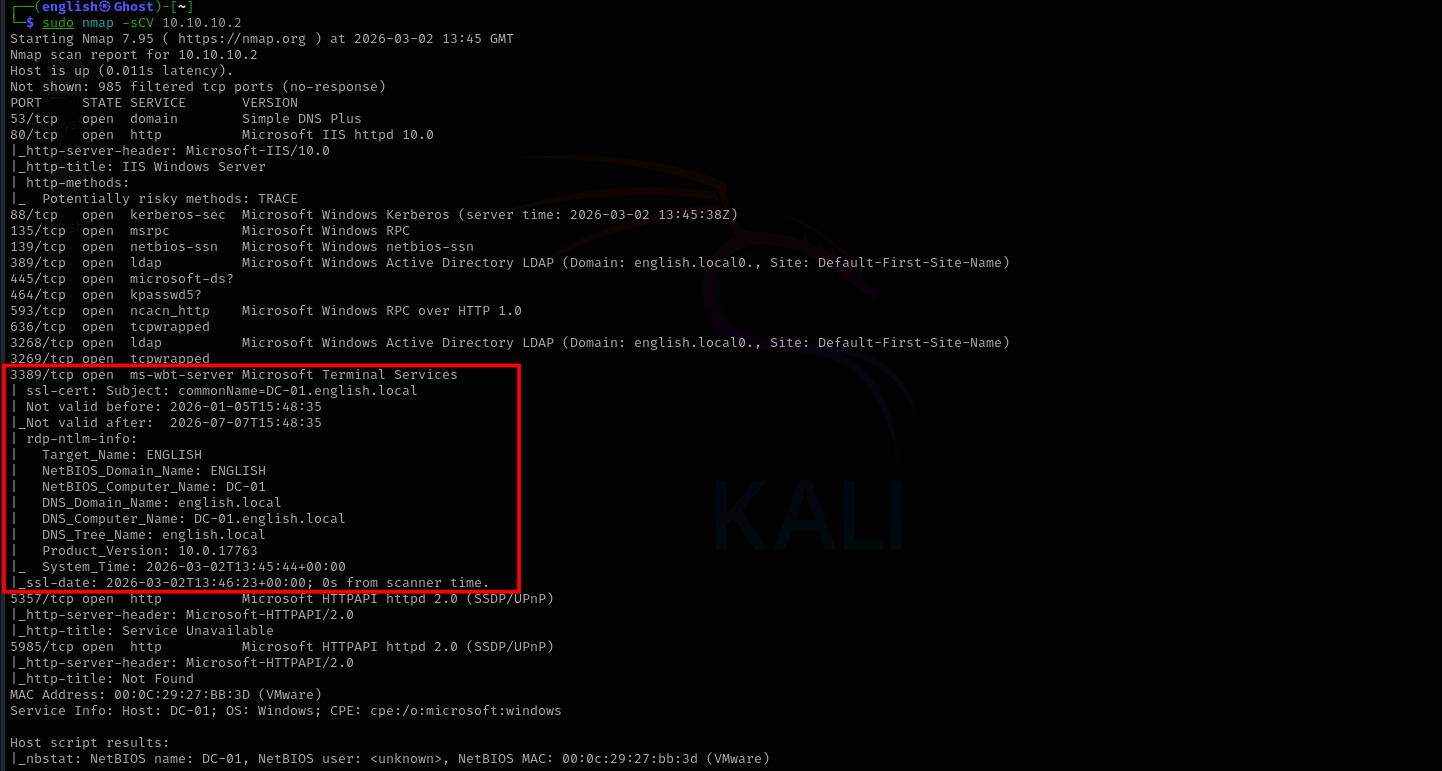
As we can see from the nmap results above, a detailed scan of the RDP service can reveal important information such as the domain name, computer name, NetBIOS domain, and operating system version. In Active Directory environments, this data provides valuable insight into the domain structure and assists in further enumeration.
Unauthenticated Enumeration
Before we have a single username or password, we check if the Domain Controller is “leaking” information to unauthenticated users. This is often where we find our first breakthrough. We can begin by checking whether anonymous access to SMB shares is permitted. If accessible, we can enumerate the available shares and review their contents for sensitive information such as configuration files, backup files, or embedded credentials.
1. SMB Null Sessions
A Null Session allows us to connect to the SMB service without providing a username or password. If the server is misconfigured, this can expose valuable information such as user accounts, group memberships, and password policies, giving us deeper insight into the target environment and potentially aiding further enumeration or privilege escalation. The following commands can be used to confirm null session:
From Linux:
1
nxc smb 10.10.10.2 -u '' -p '' --shares
nxc smb – Uses NetExec to interact with the SMB service on the target.
10.10.10.2 – the target machine
-u '' -p '' – Attempts authentication with an empty username and password (Null Session).
--shares – Tries to enumerate available SMB shares.
This command checks whether anonymous access is allowed and whether we can list shared folders without credentials. It can also be done from windows.
NetExec is a post-exploitation and enumeration tool used to interact with network services such as SMB, LDAP, WinRM, and others. It is commonly used in Active Directory environments to validate credentials, enumerate users/shares, dump password policies, and perform lateral movement checks.
From Windows:
1
net view \\10.10.10.2 /all
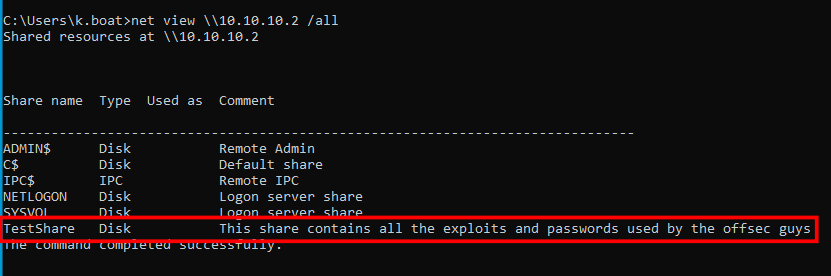
If share enumeration is successful and a share allows anonymous access, you can connect to it using:
From Linux:
1
smbclient //10.10.10.2/SHARENAME -N
//10.10.10.2/SHARENAME – The name of the share you want to connect to -N – specifies no password is going to be used (anonymous login)
![[images/smbclient.png]]
The example above shows a successful anonymous login but access to that share (TestShare) is denied
smbclient is a command-line tool used to connect to and interact with SMB shares on Windows or Samba servers. It allows you to list shares, browse directories, upload/download files, and test anonymous or credentialed access.
From Windows:
1
net use \\10.10.10.2\SHARENAME "" /user:""

We can also use a linux tool known as enum4linux to do anonymous enumeration by running the following command:
1
enum4linux -a 10.10.10.2
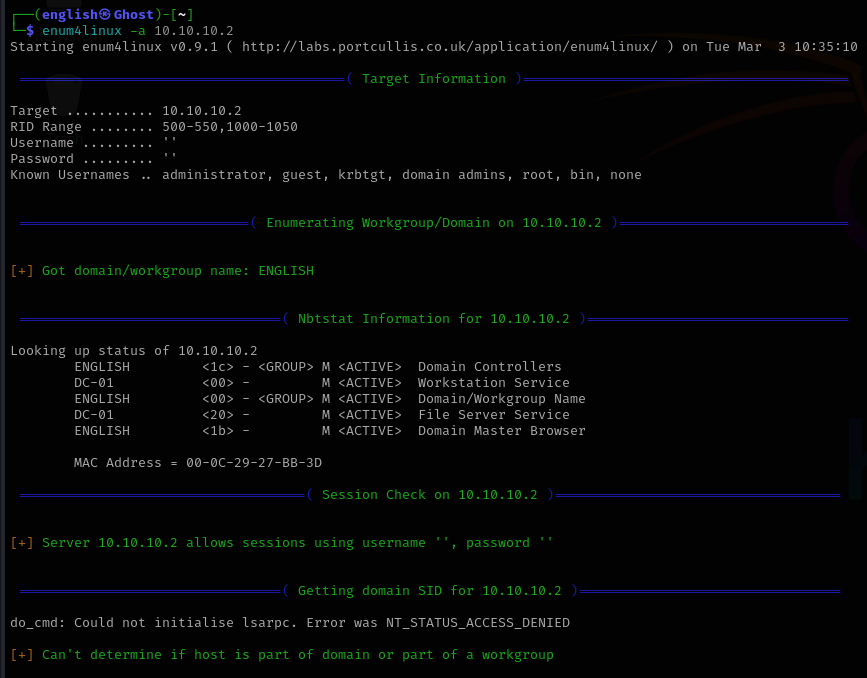
If successful, this might reveal:
- Domain Name (e.g., ENGLISH.LOCAL)
- List of Domain Users
- Password Policies (e.g., Minimum length, lockout threshold)
enum4linux is a Linux-based enumeration tool used to gather information from Windows and Samba systems over SMB
These are all great tools to use for anonymous enumeration however, in modern Windows environments (Server 2016/2019/2022 and later), Microsoft has significantly restricted what anonymous users can do. While you may be able to establish a null session, the actual enumeration is usually blocked:


2. RPC Anonymous Access
If the Remote Procedure Call (RPC) service is open to anonymous users, we can use rpcclient to query the DC for domain information.
From Linux:
1
rpcclient -U "" -N 10.10.10.2
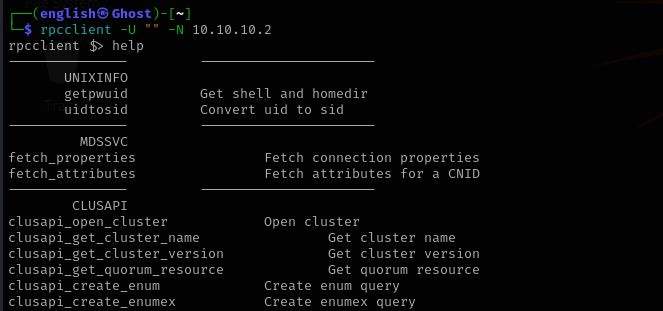
And once connected, common useful enumeration commands include:
1
2
3
4
5
enumdomusers      # List domain users
enumdomgroups     # List domain groups
querydominfo      # Domain information
getdompwinfo      # Password policy
lsaquery          # Retrieve domain SID
rpcclient is a tool used to communicate with Windows systems via Remote Procedure Call (RPC). It is often used for domain enumeration tasks such as listing users, groups, retrieving password policies, and querying domain information, sometimes anonymously if misconfigured.
However, In modern environments (Server 2016/2019+), anonymous RPC access is usually restricted. You’ll see errors such as:

3. LDAP Anonymous Bind
LDAP can be thought of as the directory service that stores structured information about objects in an Active Directory environment users, groups, computers, organizational units, and more. When LDAP is described as the “phonebook of the domain,” it means it holds detailed records about nearly everything inside the AD environment.
An anonymous bind occurs when we connect to the LDAP service without providing credentials. If the server is misconfigured and allows anonymous queries, we may be able to retrieve valuable domain information without authenticating.
From Linux:
1
ldapsearch -x -H ldap://10.10.10.9 -s base namingContexts
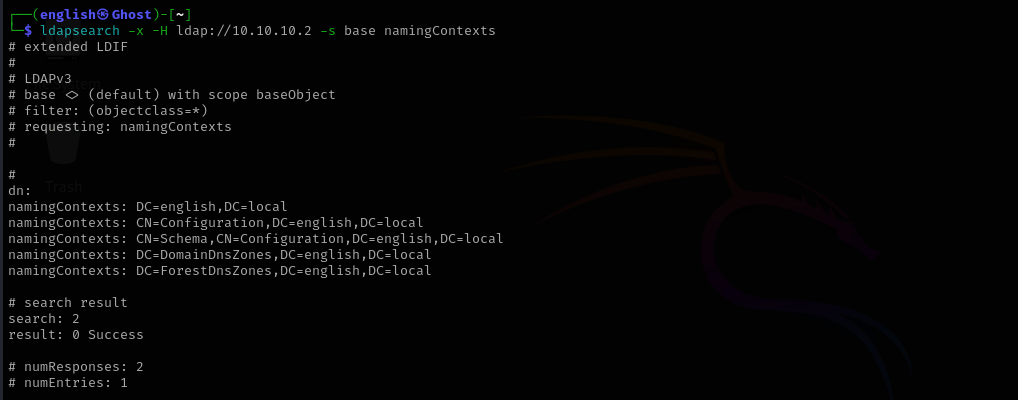
-x tells the tool to use simple authentication instead of SASL. When no username or password is supplied alongside -x, the bind attempt is anonymous.
-H ldap://10.10.10.2 specifies the LDAP server we are connecting to, in this case the target Domain Controller over standard LDAP (port 389).
-s base sets the search scope to “base,” meaning we are only querying the root of the directory rather than the entire tree.
namingContexts is the attribute we are requesting. It reveals the base Distinguished Names (DNs) of the directory partitions, such as the domain naming context (e.g., DC=english,DC=local).
ldapsearch is a command-line utility used to query LDAP directory services. In Active Directory environments, it can be used to enumerate users, groups, domain structure, and configuration details either anonymously (if misconfigured) or with credentials.
If the server responds with naming contexts, it confirms that anonymous binds are allowed. From there, we could attempt broader queries against the domain naming context to enumerate users, groups, computers, and other objects. In older or poorly configured environments, this could expose large portions of the directory structure without authentication.
However, in recent years it has become increasingly difficult to encounter environments that allow anonymous LDAP binds, especially in properly configured enterprise networks. Modern versions of Windows Server, such as Windows Server 2019 and Windows Server 2022+, disable anonymous directory enumeration by default and enforce stricter access controls at both the LDAP and Active Directory ACL levels.
LLMNR/NBT-NS Poisoning
If direct anonymous enumeration fails, we can shift from actively querying services to passively capturing credentials. In many Windows environments, when DNS resolution fails, systems fall back to LLMNR and NBT-NS, which use broadcast requests to resolve hostnames. These broadcasts are not authenticated, meaning any machine on the same network can respond, to start responder we can run the following command:
From Linux:
1
sudo responder -I eth2
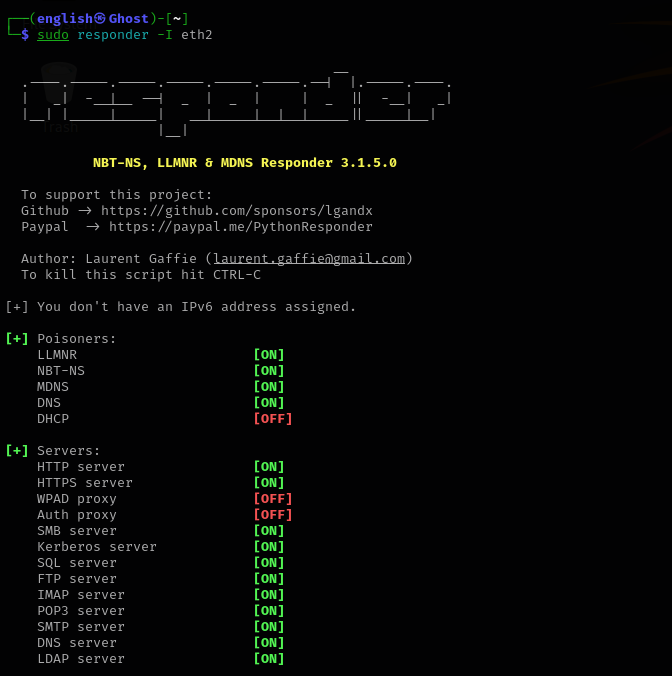
responder – Launches Responder
-I eth2 – Specifies the network interface to listen on. In this case, eth2 is the interface connected to the target network.
By running the command above, we poison these requests and trick victim machines into authenticating to us. When they do, we capture their Net-NTLMv2 hashes. Although this is not the plaintext password, the hash can be cracked offline or potentially used in relay attacks. This technique is effective because users frequently mistype hostnames or access nonexistent resources, causing authentication attempts that we can intercept and leverage to gain initial domain credentials.
Responder is a network poisoning tool used in Windows environments to intercept authentication requests. It listens for broadcast name resolution protocols such as LLMNR, NBT-NS, and mDNS, and responds pretending to be the requested host.
After we capture a hash:

we can go ahead and crack it using the following command:
1
hashcat -m 5600 k.boat_ntlmv2 /usr/share/wordlists/rockyou.txt
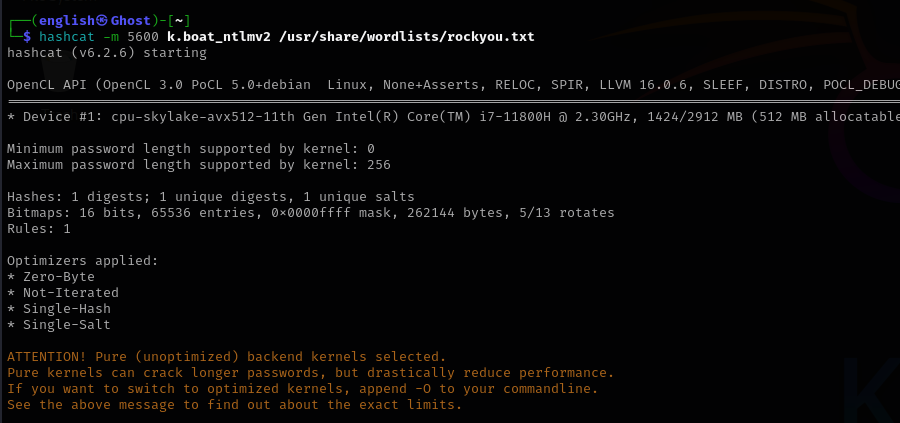
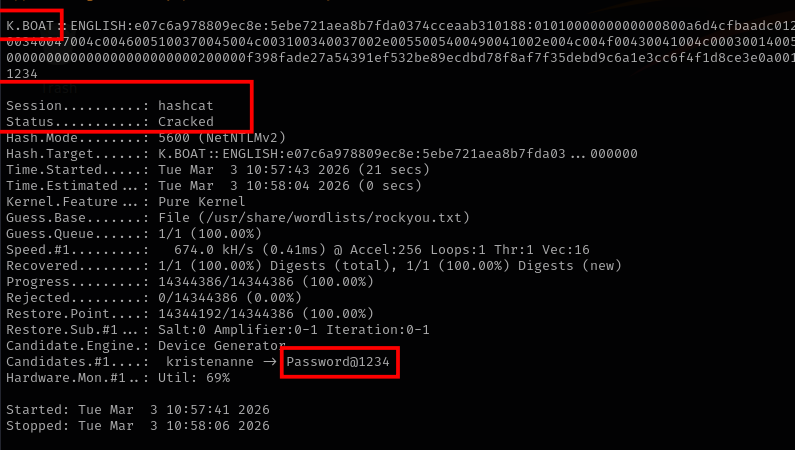
-m 5600 specifies the hash mode. Mode 5600 corresponds to Net‑NTLMv2, which is the hash type typically captured during LLMNR/NBT‑NS poisoning attacks with tools like Responder.
k.boat_ntlmv2 is the file containing the captured Net‑NTLMv2 hash. This file should contain the full hash string exactly as captured.
/usr/share/wordlists/rockyou.txt is the wordlist being used for the attack.
In the example above, we successfully captured the hash of the k.boat user by the help of responder and cracked it using hashcat.
Hashcat is a high-performance password cracking tool used to recover plaintext passwords from hashes. It supports many hash types (e.g., NTLM, Net-NTLMv2, Kerberos) and performs dictionary, rule-based, and brute-force attacks.
Finding Valid Users
In modern environments, Windows Server operating systems rarely allow meaningful anonymous access. While null sessions may still technically connect, they almost never permit enumeration of users, shares, or sensitive domain information. That said, misconfigurations, legacy upgrades, or poorly hardened environments can still expose anonymous access, so it is always worth testing. However, because these weaknesses are far less common today, Active Directory attack methodologies have shifted significantly. Modern penetration testing focuses more on identifying weak credentials, building accurate user lists, and performing controlled password spraying rather than relying purely on anonymous enumeration.
Once we obtain a list of potential usernames, whether from limited SMB enumeration, LDAP metadata, OSINT, or public employee listings, we can validate which accounts actually exist in the domain. Instead of blindly attempting password guesses and risking account lockouts, we can interact directly with the Kerberos service to safely enumerate valid users.
Using kerbrute, we can perform username enumeration against the domain controller:
1
kerbrute userenum -d english.local --dc 10.10.10.2 osint_users.txt
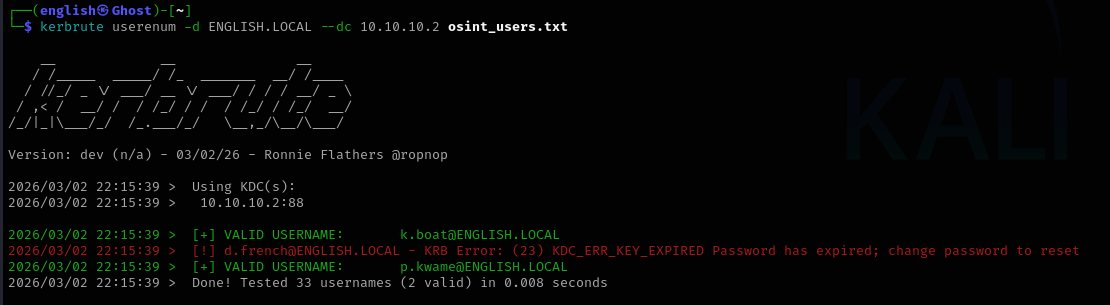
userenum – Performs username enumeration. -d ENGLISH.LOCAL – Specifies the target domain. --dc 10.10.10.2 – Points to the Domain Controller’s IP address. osint_users.txt – File containing the list of usernames to test.
In the example above, the usernames in osint_users.txt were gathered through osint( open source intelligence) and out of 33 usernames we successfully enumerated 2 valid users.
Kerbrute is a tool used to interact with the Kerberos authentication service in Active Directory. It is commonly used for username enumeration and password spraying without triggering account lockouts in most configurations.
Gaining a foothold
After successfully identifying two valid usernames, the next step is to attempt a controlled password spray using common enterprise passwords(in this case “Password@1234”). Tools like kerbrute allow us to test a single password across multiple valid accounts in a safe and efficient manner.
Password spraying must be handled carefully. The goal is to avoid triggering account lockout policies, which could alert defenders and disrupt legitimate users. Ideally, we first enumerate the domain’s password policy to understand the lockout threshold, reset timer, and observation window. This allows us to calculate safe spraying intervals.
If the password policy cannot be determined, a cautious approach is recommended, typically testing one password across all valid users and then waiting at least 30 minutes (or longer) before attempting another password. This reduces the likelihood of locking accounts and helps maintain operational stealth while attempting to gain an initial foothold in the domain. The password spray can be performed by running the following command:
1
kerbrute passwordspray -d ENGLISH.LOCAL --dc 10.10.10.2 osint_users.txt 'Password@1234'
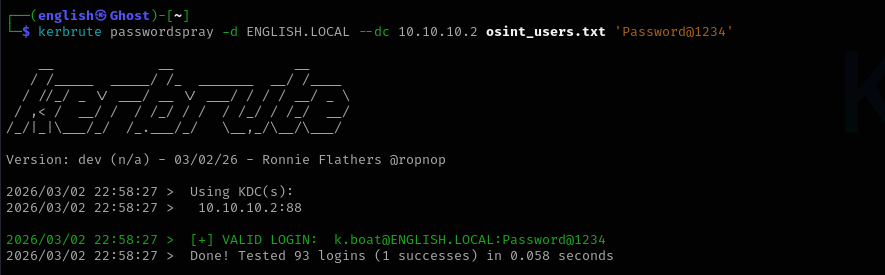
passwordspray – Mode used to spray one password across many users -d ENGLISH.LOCAL – Target domain --dc 10.10.10.2 – Domain Controller IP osint_users.txt – File containing valid usernames Password@1234 – The single password being tested against all users
After executing the spray, we receive a successful authentication response for one of the accounts(k.boat). This indicates that the password is valid for that user and that we have successfully obtained working domain credentials.
To verify the credentials and further validate access, we can use a tool like nxc to authenticate against the Domain Controller and enumerate details such as the domain password policy. This not only confirms the credentials are valid but also provides insight into lockout thresholds, complexity requirements, and other security settings that will guide future actions:
1
sudo nxc smb 10.10.10.2 -u 'k.boat' -p 'Password@1234' --pass-pol
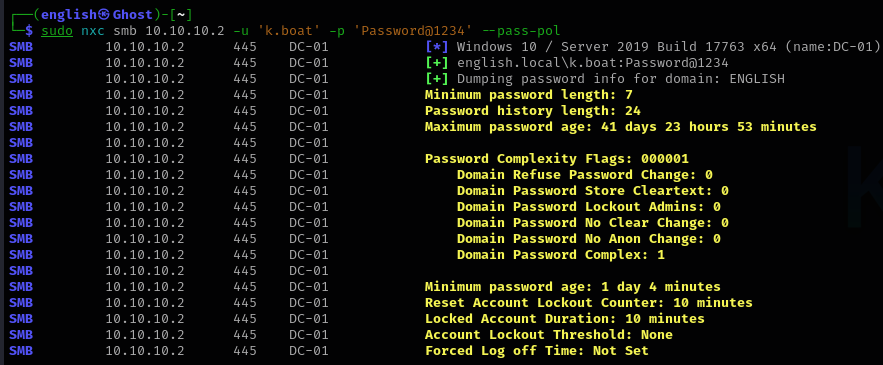
After validating the credentials, we enumerated the domain password policy and the most important detail here is that the Account Lockout Threshold is set to None, meaning accounts will not automatically lock regardless of failed login attempts.
Review
At this stage, we have successfully:
- Identified the Domain Controller
- Performed unauthenticated enumeration
- Leveraged Kerberos username enumeration
- Executed a controlled password spray
- Obtained valid domain credentials
With working credentials in hand, the engagement shifts from unauthenticated enumeration to credentialed enumeration. From here, we can begin deeper Active Directory reconnaissance such as enumerating domain users, groups, ACLs, sessions, shares, Kerberos tickets, and privilege relationships. These techniques will be covered in the subsequent modules.
Conclusion
Active Directory enumeration is rarely about a single technique. It is a layered process. Modern Windows environments are far more hardened than older deployments, which means anonymous enumeration paths often fail. As a result, attackers and penetration testers must adapt by combining multiple approaches: testing for misconfigurations, abusing legacy name resolution protocols like LLMNR/NBT-NS, performing LDAP checks, building accurate user lists, and carefully executing password sprays.
This guide walked through the journey from zero access to obtaining the first set of valid domain credentials. From here, the real depth of Active Directory attacks begins.
In Active Directory, patience and methodology win every time.